How it works

See What Your Team Can Build With Warehouse AIThe Warehouse AI Platform, End to End

Build applications, automate workflows, and optimize decisions using your warehouse data & knowledge.Full orchestration runs your shift — one live plan for labor, doors, waves, and inventory flow. The AI App Builder fills every gap around it.

Viewing the AI App Builder — start here, add full orchestration when you're ready.Viewing the full platform — orchestration plus everything the App Builder does.

Trusted by industry leaders

PepsiCo GXO Mars Kellanova P&G IKEA General Mills NFI Holman Logistics United Facilities

Getting connected

Layer on top of your existing WMS in a week.

Your IT team provides read access. Your operators confirm the local rules. We connect, map, and validate the initial data for your first operational priority.

Outcomes your team builds

Build applications

Tools your site runs on, made with your data

Automate workflows

Conditions watched, people notified, actions taken

Optimize decisions

Labor, doors, and flow coordinated as the shift moves

▲  Run by full orchestration

Full Orchestration

One live plan runs the shift.

The optimization engine sequences labor, doors, equipment, and inventory flow together — and re-solves the plan all shift long as conditions change. Decisions land back in the queues your floor already works from.

▲ Live data up▼ Decisions pushed back
▲  Built on the platform

AutoScheduler

The Warehouse AI Platform

Six years & hundreds of applications worth of warehouse expertise & optimizations built in. As soon as your data is connected, the platform already knows what to do with it.

Unifies your data

One model across WMS, labor, yard, ERP, and production, instead of five systems that disagree.

Adds a semantic layer

Your fields mapped to warehouse meaning: loads, moves, waves, doors, shifts, standards.

Runs the algorithms

Labor, doors, equipment, and inventory flow solved together, and re-solved as conditions change.

Delivers automations

Conditions watched continuously, with notifications and approved actions that run without you.

▲  Connected in about a week

Your existing systems

  • WMS
  • Labor
  • Yard
  • ERP
  • Production

Connect · Map · Validate

About one week

Step by step

From your systems to live applications.

1

Connect the sources

Read-only access to WMS, labor, yard, ERP, and production. API or flat file. One connection.

2

Map into the semantic model

We map your data into our unified semantic model: loads, trips, moves, waves, doors, shifts, standards.

3

Model your site

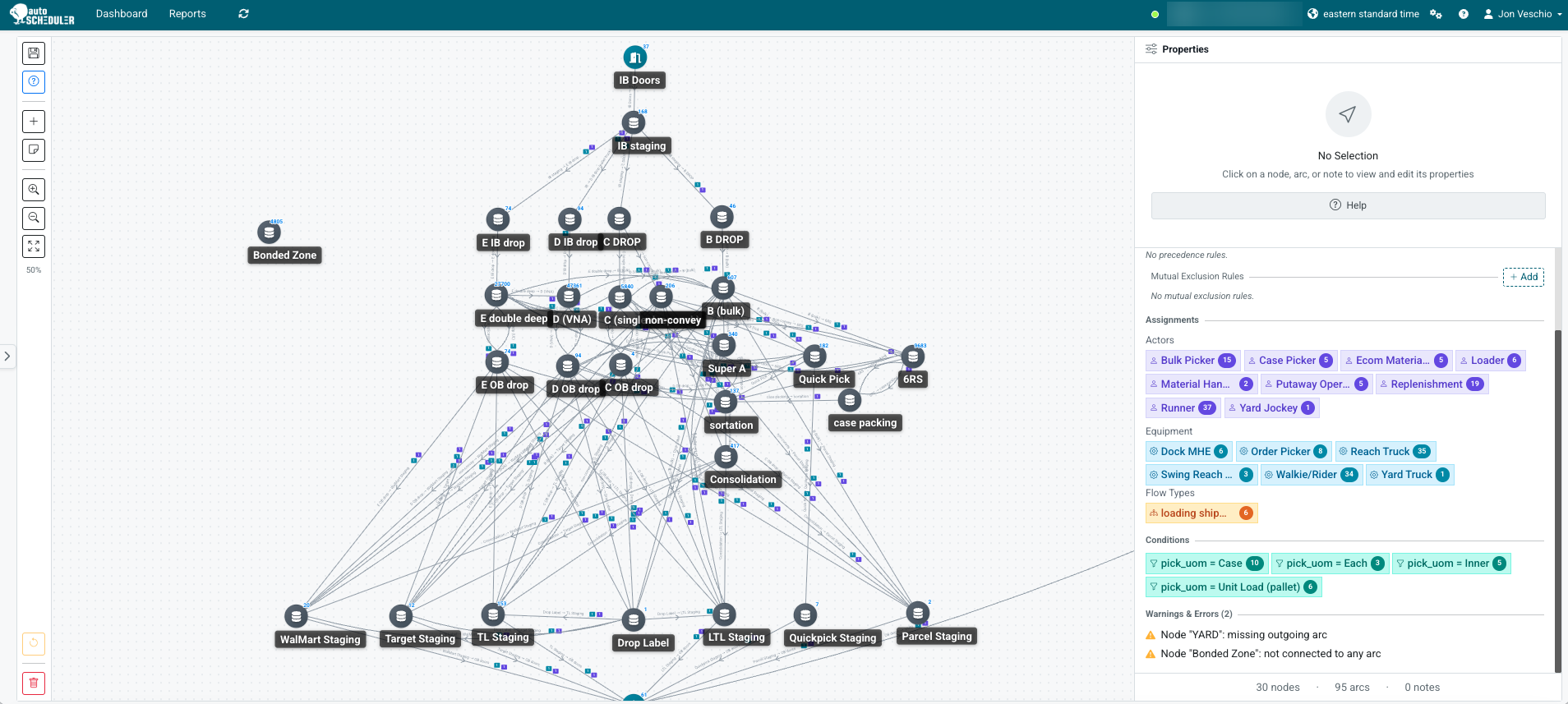
Draw your site as a graph of locations, allowed movements, resources, and constraints in the Workflow Designer.

4

Validate with your operators

The people who run the site confirm the mapped data, the site model, and the local rules.

5

Run the optimization engine OptionalCore · Full orchestration

The solver sequences labor, doors, and flow when you need exact next actions and real performance targets.The solver runs the shift: one live plan for labor, doors, equipment, and flow, re-solved continuously and pushed back to your WMS.

6

Build an application

Ask in natural language. The platform builds against your semantic model. Iterate with your team until it’s right.

7

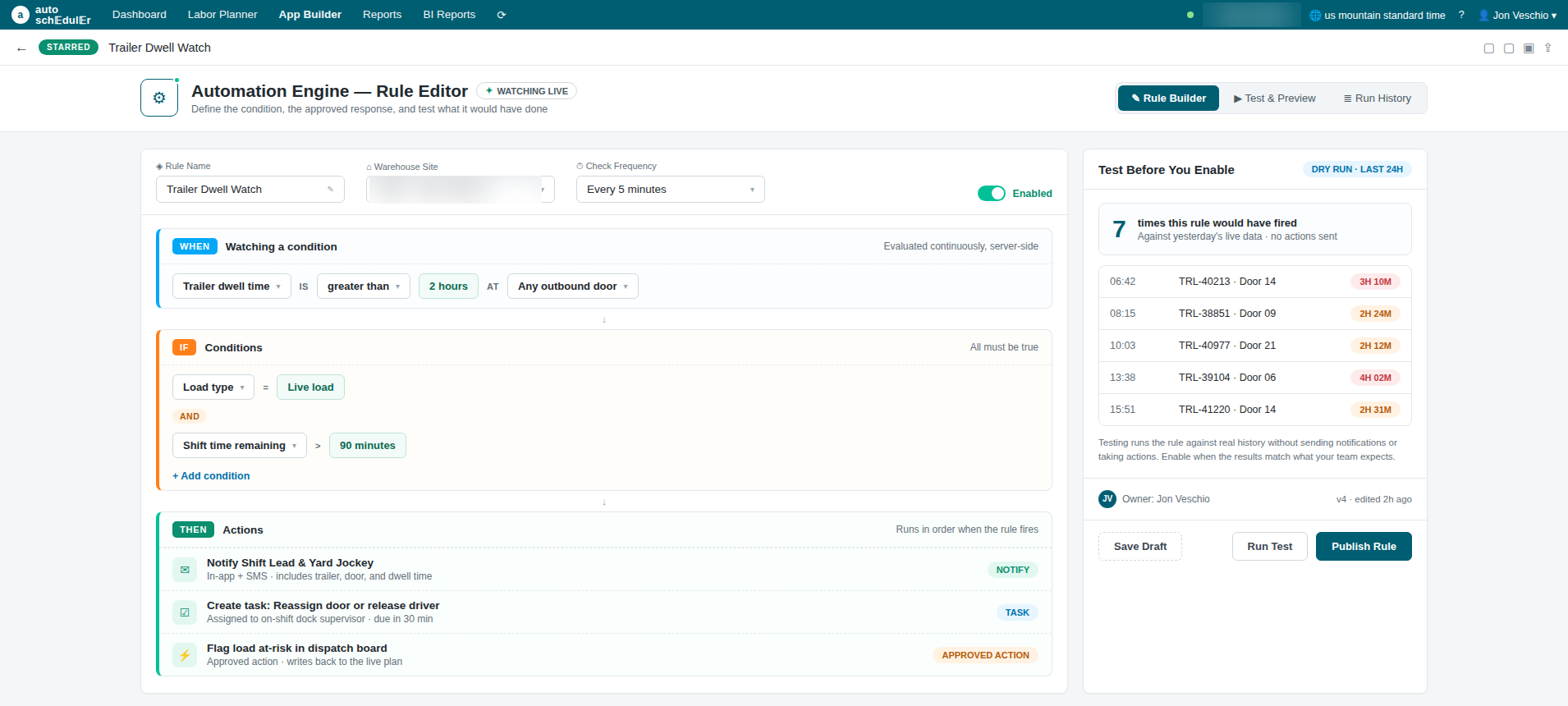
Add automations

Set a trigger, an observation, a condition, and an action. It runs server-side, continuously, and fires on change.

8

Publish with guardrails

Set permissions, test the action without sending it, name an operational owner. Then it goes live.

Capabilities

Build. Automate. Optimize.

Use the capabilities you need. Choose where software recommends and where it acts.

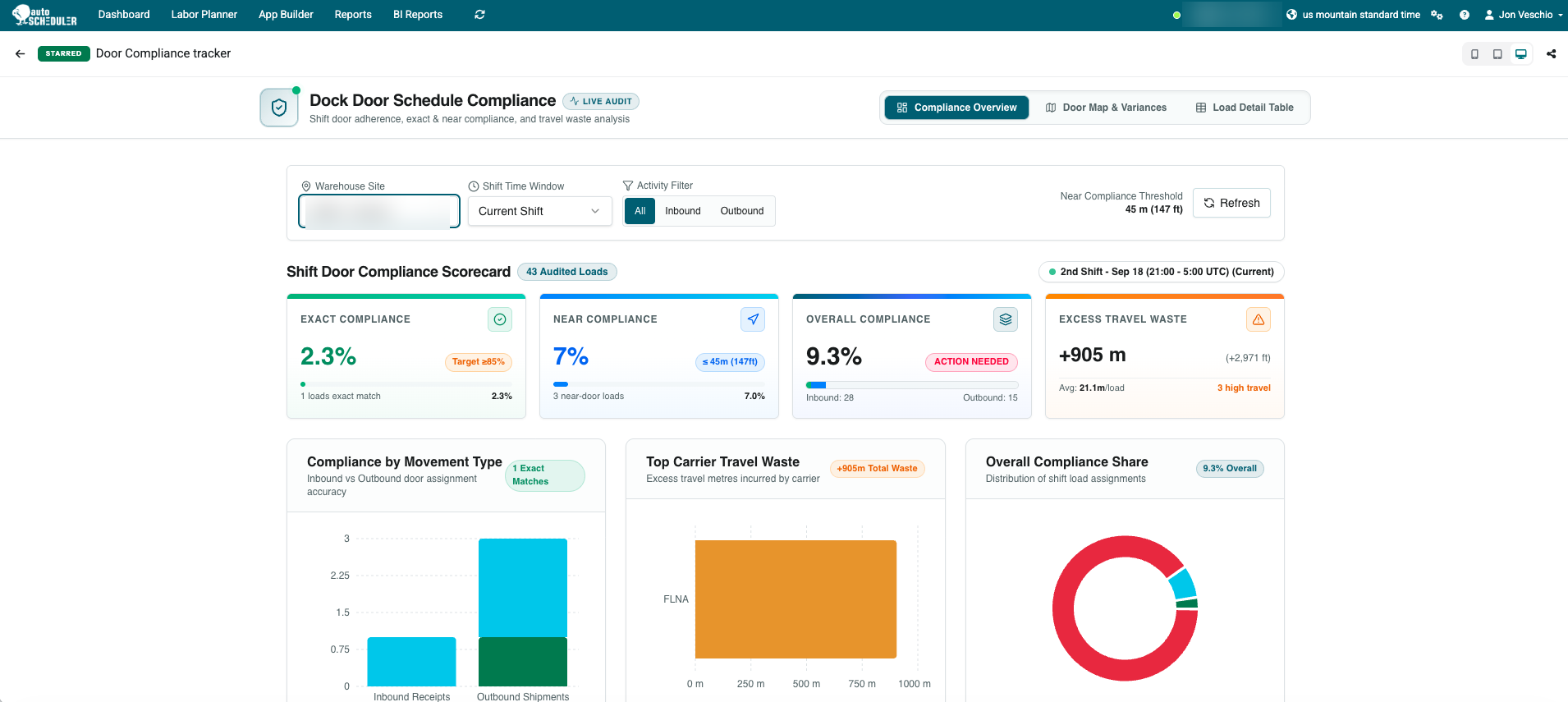
Door Compliance Tracker application built with the AI App Builder, showing shift door compliance scorecard
Build applications

Describe what you need. Create an application using your data, warehouse knowledge, and available algorithms. Refine it with your team or AutoScheduler experts.

Door Compliance Tracker · Planned door against the door actually used.

Walkthrough

See it work.

Applications built from warehouse data: shift labor planning, inventory health, and productivity trends.

AI Enables Warehouse Applications from Data Watch on Loom

Examples

Examples of applications people have built.

Current and live applications from our customers, across inbound, yard, outbound, labor, inventory, and production.

Storage trailer planner

When to unload, and with what

Door router for Vend loads

Belt or standard door by case-pick mix

Labor needs by shift

Headcount per role for the next N shifts

Historical throughput

Cases and loads moved by shift and day

Door compliance tracker

Planned door against door actually used

Trailer dwell and detention

What is sitting, and what it costs

At-risk load board

Trips trending late against appointment

Shift handoff sheet

What the next shift is inheriting

Cuts and shorts

Which orders are short, and why

Site opportunity report

Scheduled labor against planned work hours

Storage utilization by zone

Where space is tight before it bites

Equipment utilization

Forklift and reach truck load by shift

FEFO receipt priority

Which inbounds to put away first

Live load dwell

Drivers waiting, ranked by wait time

Custom load-out process

Your unload rules, your tabs, your terms

Inbound priority

Which receipts to work next

Crossdock prioritization

What moves straight through

Carrier workload projection

Volume by carrier, ahead of the week

Trailer need

How many empties the site is short

Load sequencer

Build order for each trailer

Load readiness

What is staged, and what is missing

Load fill

Trailer cube and weight utilization

Swap options for at-risk loads

Donor loads that can cover a short

Dispatch tracker

What left, what is late, what is next

Live crewing and attendance

Who showed up against the plan

Standards against actuals

Where the labor plan and reality diverge

Pallets and cases per hour

Rate by team, shift, and area

Start time compliance

Whether shifts start when they were planned to

Shift throughput

Output by shift, drilled down to the load

Replenishment monitor

Pick faces about to run dry

Pallet expiration

Product aging out, and where it is sitting

Bank space against production

When production will outrun storage

Allocation modeler

Simulate moving pallets between zones

SKU velocity

Movement and volume by item

AGV dashboard

Charging state, faults, and units out of service

Production flow

Line output against the shipping plan

Express move opportunities

Where the model and the facilitator disagreed

Attainment drill-down

Weekly summary down to the shipment ID

Do now

What to start in the next hour

What would you build?

Governance

Build quickly. Stay in control.

Access

Decide who can view, build, and publish.

Actions

Test automations before enabling approved actions.

Ownership

Give each application a named operational owner.

Traceability

Inspect source data, calculations, and automation activity.

Results

Proven in warehouse orchestration.

35%

more product flow

PepsiCo

9–14%

higher labor productivity

Fortune 100 food and beverage manufacturer

96%

less workforce planning time

P&G

Results from established orchestration deployments.

Questions

Frequently Asked Questions

Fit

Is AutoScheduler a WMS replacement?

No. Your WMS stays the system of record and it keeps executing. AutoScheduler runs on top of it, reads from it, and sends decisions back to it. We don’t rip and replace, and we don’t compete with your WMS vendor. Most of our customers picked their WMS years ago and aren’t changing it, which is exactly the point.

How is this different from giving my team a BI tool?

A BI tool shows you what happened. It doesn’t know what a wave, a dock appointment, or a short ship is, so your team spends weeks defining all of that before the first chart is worth looking at. Ours already knows. And BI stops at the chart. It can’t watch a condition, act when it changes, or coordinate labor and doors as the shift moves.

Our site is unusual. Will the model actually reflect how we run?

That’s the part we spend the most time on. In the Workflow Designer we map your site with your people: every place inventory can sit, every allowed movement between them, and the resources and constraints attached to each one. If a rack can’t feed a door on second shift, that goes in the model. The sites that know themselves best produce the most detailed maps, and those are the ones the engine plans best.

Do we have to do all three: build, automate, and optimize?

No. They run on the same foundation, so you can use one, two, or all three, in whatever order fits. Some sites start by replacing a handful of spreadsheets with applications. Some start with a single automation that watches one number nobody has time to watch. Optimization is scoped as its own piece of work, and it doesn’t have to come first or last.

Getting started

What does integration actually require from my team?

Read access from IT, and time from the operators who know the local rules. We do the connecting, mapping, and validation. For your first operational priority, that’s about a week. Modeling your full site for optimization is scoped separately, because the answer depends on how your site runs.

What data do you connect to?

Whatever supports the first problem you want to solve. Usually that means the WMS for orders, inventory, and tasks; labor systems for standards and attainment; yard and dock systems for trailers and appointments; and ERP or production for plans and material needs. You don’t have to connect all of it on day one, and most sites don’t.

How quickly do we see something real?

You can be building on your own data in about a week. The first applications and automations follow as soon as your team knows what it wants to see and what it wants watched. Orchestration outcomes arrive on the timeline of that work rather than in the first week.

Building, owning, and acting

Who builds the applications, you or us?

Both, and the mix shifts over time. Early on, AutoScheduler experts build alongside your team, so you end up with working applications and people who know how to make more. After that, most get built by whoever needs them: planners, supervisors, site leads. No developer, no ticket queue, no six-week wait for a report.

What happens when an application is wrong?

You refine it in the next sentence, or you roll it back. Every change is a version and every version restores in one step. And every application can show its source data and calculations, so “that’s not right” turns into “that field is stale” instead of an argument.

Can automations take action in our systems, or only notify?

Both, and you decide which. An automation can notify the right people, or trigger an action you’ve approved in advance. You test a rule and see what it would have done before you enable it. Acting inside your systems is a switch you turn on deliberately, not a default.

Where does our data live, and who can see it?

Your data stays yours, and sites and tenants are isolated from each other. Access is explicit: you decide who can view, who can build, and who can publish. Credentials live in the platform, never inside an application or an automation rule. Every automation run, every override, and every publish is recorded.

Next step

Start with one operational priority.

Let’s pick one problem and start there. Once that’s solved, let’s move to the next one. We’ll work with you to prove that AI can learn your sites to drive value.